I Vibe Coded in a Job Interview. Then I Over-Engineered It.
I had an interview today. A different kind of one.
Four rounds in with this company, each one more involved than the last, and then they set round five. The brief said something I had not seen before: come ready to vibe code during the session. Have Cursor, Claude Code, Antigravity, or anything similar set up. Also have a Python interpreter ready with packages installed in a virtual environment, just in case.
So I prepared. Claude Code was already my daily setup. VS Code open on the side. I spun up a fresh Python venv and installed the usual suspects: numpy, pandas, requests, fuzzywuzzy, rapidfuzz. Covering my bases without knowing the exact task. By the time the call started, the only unknown was what I would be building.
The ask
The interviewer was clear and direct. Build a search bar. It should search through a list of elements. Add fuzzy search so that close spellings still return results.
That was it.
Simple in scope, but the moment I heard it I already had too many thoughts. My first instinct was a full Next.js app with a proper component tree, a custom debounce hook, maybe a small API route. The interviewer picked up on that direction and made clear that was not what this session was for. A page and a data file was enough.
That reframe was useful. Sometimes the right answer is not the most complete answer. I went with a single HTML file backed by a JSON file of company data. No build step, no framework, no ceremony.
What got built during the session
I added features one at a time, explaining my thinking out loud as I went.
- 01Basic keyword search. Find exact or partial matches in the name and description fields. Highlight the matched term in the result.
- 02Fuzzy search. Words do not need to be exact. Close spellings, one character off, should still surface the right result.
- 03Domain-aware matching. If
google.comis in the data and someone typesgoogle.net, it should still match. Strip the TLD and compare on the root domain. - 04Similarity score. Show a percentage next to each result so it is clear why something matched and how confidently.
The domain matching got a good reaction. The idea that someone might not remember whether a service uses .com or .io is a real edge case, not a contrived one, and handling it explicitly rather than hoping fuzzy covers it felt like the right instinct to surface.
After the build, the interviewer shifted gears. How do you approach a problem like this from scratch? What edge cases would you expect? What breaks first when the dataset gets large?
I talked through a few: single-character queries returning too much noise, multi-word queries where a partial match creates irrelevant results, queries that are genuinely ambiguous versus queries that are just misspelled, performance degrading as the dataset grows beyond what fits comfortably in memory. It went fine. Nothing spectacular, just honest thinking out loud.
Post-interview
I closed the call, made a coffee, and then did the thing I always do.
I reopened the file and started adding things.
The project is called overbuilt. The name is the joke. The about page opens with: "Most search engines are simple. I decided to make this one ridiculously complex. Yes, it is beautifully over-engineered."
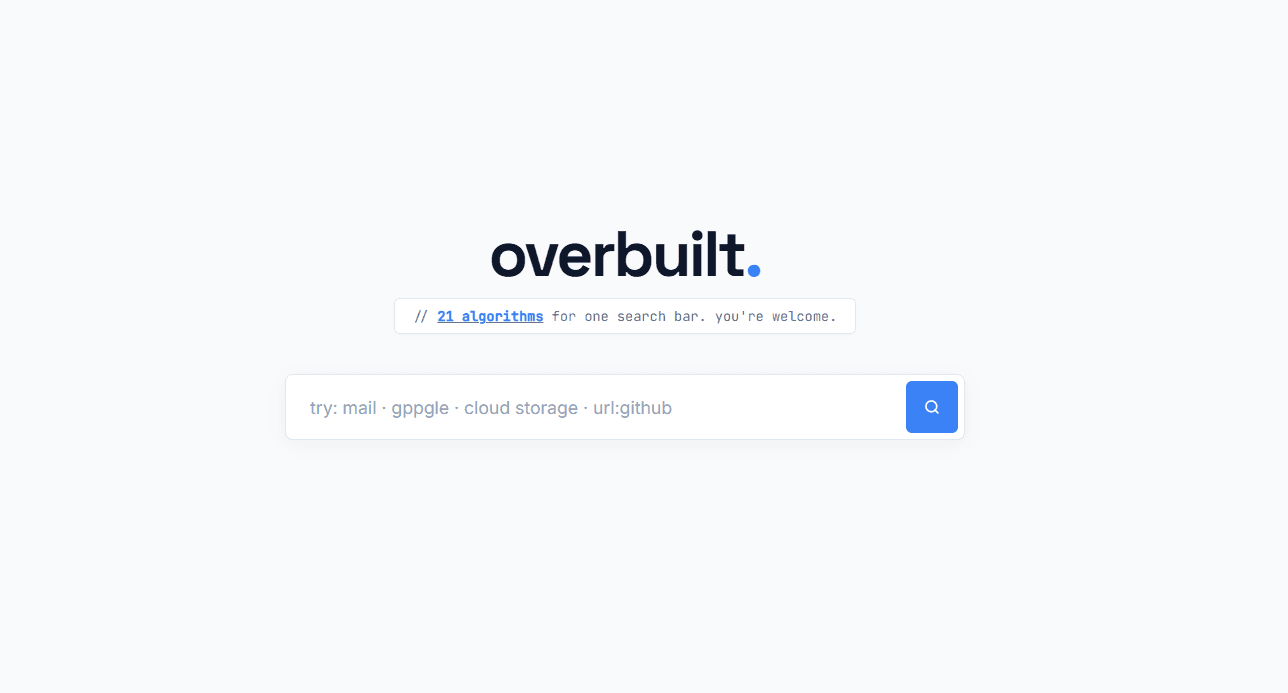
It searches a static list of 1,000 companies. It does this with 21 parallel algorithms.
You can try it here.
The 21 algorithms
Every search runs all 21 algorithms simultaneously. Each one produces a score from 0 to 100. The scores get weighted and fused into a single confidence value shown on each result card. Hover the chart to see what each algorithm actually does.
21 ALGORITHMS, WEIGHT BY CATEGORY
HOVER EACH ROW TO SEE WHAT THE ALGORITHM ACTUALLY DOES
The algorithms fall into four groups.
Core matching
These five handle the straightforward cases first, before anything expensive runs.
Exact match is what it sounds like. Prefix match checks whether the query is the beginning of the name, scored by coverage. Word prefix checks the start of any individual word in a multi-word name, so go surfaces both Google and GoTo. Substring matching uses a longest common substring algorithm and only scores if at least 40% of the query is covered. Abbreviation expansion is a hardcoded map: yt becomes YouTube, gh becomes GitHub, gd becomes Google Drive.
That last one is not elegant, but for a bounded domain it is more reliable than any generalised approach. The map is small enough to read in five minutes and wrong in knowable ways.
Fuzzy and typo handling
This is where things got out of hand.
Keyboard typo distance computes edit distance, except that adjacent keys on a QWERTY layout only cost 0.4 instead of 1.0. So gooogle and goigle are penalised differently, because one is a key right next door and the other is not. The DP matrices are pre-allocated as Float32Array[100][100] at startup so there is no garbage collection pressure on each keystroke.
const KB_DP = Array.from({ length: 100 }, () => new Float32Array(100));Pre-allocating typed arrays once at load time and reusing them is the main reason search stays under 2ms at 1,000 entries. Allocating new arrays inside a function that runs on every keystroke will trigger the garbage collector mid-search and cause visible stutters.
N-gram trigram similarity splits both query and target into overlapping 3-character chunks and computes Jaccard similarity over those sets. The n-gram sets for all 1,000 companies are pre-computed at load time.
Soundex phonetic encoding maps names to a consonant-digit code and matches on that. Googel and Google resolve to the same Soundex value. Practically speaking, phonetic matching is overkill for a company name dataset, but it handles the cases where someone's brain is thinking of the sound of a name rather than the spelling.
Acronym matching extracts the first letter of each word in multi-word names. Amazon Web Services becomes AWS. A full match scores 85%, a partial match scores 45%.
Character transposition specifically detects when exactly two adjacent characters are swapped and nothing else is different. googel scores 95% for google via this path. The algorithm is Damerau-Levenshtein, which treats transposition as a single operation rather than two separate edits.
Negative matching is the only penalty signal. If the query has more than one word, any result missing one of those words loses 40 points per missing word. This stops google docs from surfacing results that only contain docs.
Semantic context
Synonym graph is a hardcoded map of around 70 semantic mappings. Searching email surfaces Gmail and Outlook. Searching payment surfaces PayPal and Stripe. A direct synonym scores 70%, a transitive match scores between 50 and 65%.
Domain normalisation strips https://, www., and any path, then matches on the root domain using the keyboard typo distance. This is the interview feature, rebuilt properly. google.net matches google.com. githb.io still surfaces GitHub.
The other three in this group: description matching applies the same LCS logic to the description field at 60% of the name score weight, multi-word analysis requires all query words of three or more characters to appear in the target, and tag matching checks against each company's categorical tags array.
Personalization
This category took the longest and made the least practical sense for a single-user static file. That did not stop me.
Popularity tracks how often each company has been searched across sessions, stored in localStorage. Bonus is capped at 15 points.
Click-through tracks per-query per-company click history. If you searched drive and clicked Google Drive three times in past sessions, Google Drive gets boosted on future drive searches. This signal carries the highest weight multiplier in the system at 1.5x.
Recency maintains an LRU stack of the last 20 visited companies. More recent visits score higher: max(0, (10 - position) / 10) * 8.
Time-aware routing reads the current hour. Between 9 and 17, productivity tools (Slack, Notion, Google Docs) get a +15 boost. After 18, entertainment apps get boosted. Between 6 and 9, mail and news get priority.
Session context watches the sequence of recent queries in the current session. If your last query was google and the current one is drive, Google Drive gets a +20 boost because the pattern suggests that is probably the destination.
How the score actually works
Every algorithm produces a raw score between 0 and 100. Each score is multiplied by its weight. But the final confidence is not a sum of all weighted scores, which would produce nonsensically high numbers. It is a best-signal-plus-bonuses model:
const best = Math.max(exact, prefix, wordPrefix, domain, substring, ngram, ...);
const extras = Math.min(10, popularity + clickthrough + recency);
const bonus = Math.min(15, numActiveSignals * 3);
const confidence = Math.min(100, best + bonus + extras);
This means a result can not score above 100 just because six weak signals all fired simultaneously. The confidence ceiling is hard. The reason chips on each result card show exactly which signals contributed.
There is also a stage-3 re-ranking pass that groups results by their first word and caps same-group results at 2 unless confidence is above 85%. This stops the query goo from returning five Google products before anything else appears.
The UI
Three panels:
The left sidebar shows query suggestions based on recent searches and globally popular queries.
The center shows result cards. Each card has the company name with matched text highlighted, a description snippet, the URL with domain highlighted, color-coded reason chips (exact, prefix, fuzzy, domain, etc.), and a confidence percentage badge. Clicking the info button opens a diagnostics modal.
The right Signal Panel has 21 rows, one per algorithm, each showing a label, an animated score bar, and the current numeric value. It updates in real time as you type.
The diagnostics modal is the part I spent too long on. It shows every algorithm that scored above zero, the raw score, the weight multiplier, the weighted total, any contextual notes, and at the bottom the full formula:
exact·85 + prefix·40 + keyboard·30 + ngram·22 + recency·6 → 89%
If a search returns nothing, a "Did You Mean" fallback shows the single closest match based on the best individual algorithm score across all companies.
The data
The 1,000 company entries were generated by gen.js. Names are assembled from a prefix list (Aero, Bio, Cyber, Data...), a root list (base, cast, com, core, flow...), and a suffix list (AI, Systems, Labs...). Each entry gets a description, a set of tags, auto-generated synonyms, and a domain with a random TLD. The resulting JSON is 417KB, large enough to make the pre-computation worth thinking about, small enough to sit comfortably in memory.
What this was actually about
The interview task was: build a search bar with fuzzy matching. I built that. It worked. The session went fine.
The version sitting at overbuilt.vercel.app is not that version.
The 21-algorithm version exists because once the call ended, the question stopped being whether I could pass an assessment and became something else: what would it look like if a search result could show you exactly why it appeared? Not just a confidence number, but the full reasoning. Every signal. Every weight. The actual formula.
There is a version of this that is fuzzywuzzy wrapped in a div. That version is correct. It answers the question that was asked.
This version is what happens when the question becomes a problem worth caring about.
The name was always going to be overbuilt.
If this was worth sharing, send it to someone on 𝕏 or LinkedIn. Got a question or a thought? Drop me a message , I read everything. If this was worth your time, .